
Direct Chat & Messaging
LongnineProductivity
4.5310.00 Reviews
- Version
- 1.0.21
- Installs
- 10.00M
- Age Rating
- Everyone
Screenshots
Our Review of Direct Chat & Messaging
 Analysis by Appyee
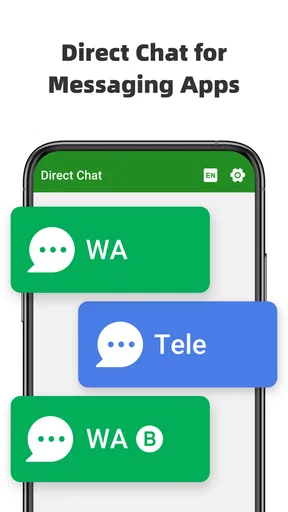
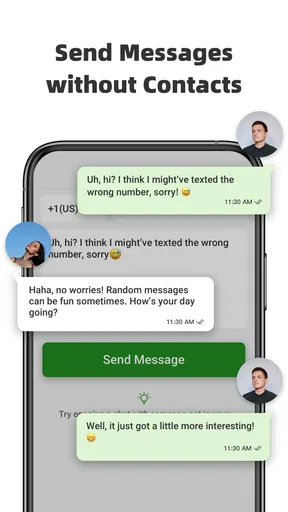
I use messaging apps every day, and one small annoyance comes up constantly: I need to send a quick message, but I do not want to save a number that I may never contact again. Direct Chat & Messaging is built around that exact situation. It is a productivity app from Longnine that focuses on starting chats without adding contacts, while also supporting two WhatsApp accounts on one device.
That sounds simple, and in practice the app is at its best when it removes a tiny bit of friction from a routine task. I found it more useful as a shortcut tool than as a replacement for WhatsApp or another full messaging platform. It helps me get from a phone number to a conversation quickly, but the actual messaging still depends on the supported WhatsApp setup rather than happening inside a completely separate chat network.
The app is free to install, with optional in-app purchases priced between $4.99 and $9.99 per item. It is rated for Everyone, works on Android 7.0 and later, and the current version is 1.0.21. With a 4.5 average from around 78 thousand ratings and over 10 million installs, it has clearly found an audience beyond a very narrow group of users. I can understand why: its purpose is immediately clear, and the problem it addresses is common.
How Direct Chat & Messaging feels in everyday use
I find the app easiest to judge by the small moments it is meant to improve: getting from an unfamiliar number to a chat, and keeping two WhatsApp identities on one device. In this section, I’ll look at how those shortcuts fit into ordinary routines, including where a quick route saves time and where a deliberate check still matters.
A focused shortcut instead of another inbox
The main experience is centered on direct chat. Rather than treating the app as a new social network, I see it as a bridge between a phone number and a WhatsApp conversation. That distinction matters. If you expect a separate inbox, a new contact system, or a complete messaging service with its own identity, this is not the right mental model.
For a quick conversation with a delivery driver, a seller, a repair technician, a temporary coworker, or someone helping with an event, avoiding the address book can be genuinely convenient. I do not have to create a permanent contact entry simply because I need to ask one question. Once the conversation is no longer useful, my contacts remain cleaner.
The practical advantage is strongest when I already know the number and want to act immediately. It is less impressive when I am managing a long-term relationship, because saving a trusted contact still makes sense for recognition, search, and future communication. The app does not remove the need for good contact organization; it gives me another choice for short-lived conversations.
Why the dual-account option changes the value
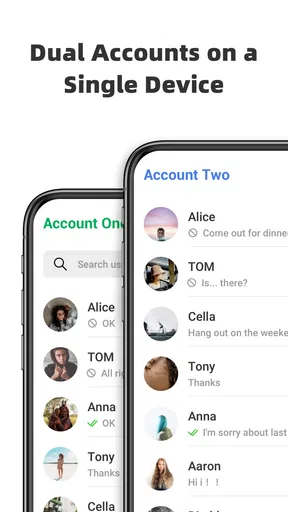
The second major use is running two WhatsApp accounts on a single device. This can be helpful for people who separate personal and work communication but do not want to carry two phones. A small business owner, freelancer, student with a side job, or anyone with separate numbers may appreciate having both identities available from one handset.
I would not treat this as a magic solution for every dual-account problem. Two accounts are only useful if I can keep notifications, replies, and account context straight. The convenience of one device can quickly turn into confusion if I answer a customer from a personal account or miss a message because both sides look too similar. My advice is to establish a simple routine: check which account is active before sending anything important, especially when moving quickly between personal and work chats.
This is one of the app’s less obvious trade-offs. The feature can reduce hardware clutter, but it increases the importance of attention. It is a productivity aid, not an automatic boundary between two lives. Users who need strict separation, independent backups, or organization-level controls may still prefer separate devices or the account-management tools already offered by their messaging setup.
A realistic scenario where it earns its place
Imagine that I am arranging a furniture pickup through a marketplace. The seller gives me a number, but I only need to confirm the meeting point and arrival time. Saving the number would create a contact I probably will not use again. With a direct-chat workflow, I can start the conversation, send the necessary messages, and leave my address book untouched.
Now imagine the same afternoon includes a work WhatsApp account and a personal one. The dual-account function can keep me from switching between phones while I coordinate the pickup and answer a client. That combination—temporary chats plus account separation—is where the app feels more purposeful than a basic contact shortcut.
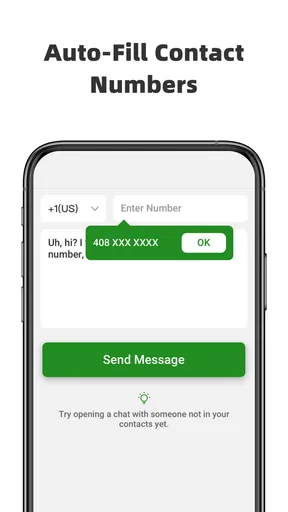
The limitation is that this workflow depends on accuracy. A mistyped number, an incorrect country prefix, or choosing the wrong account can send me in the wrong direction. I recommend checking the number and country code before starting a sensitive conversation. For routine questions this takes only a moment; for payments, addresses, or business commitments, that moment is worth taking.
What the current release tells me
The current release, 1.0.21, shows that the app is still being maintained as a focused utility rather than presented as a large, all-purpose productivity suite. Its evolution is best judged by whether the direct-chat flow becomes more dependable and whether dual-account handling stays understandable as users move between identities.
I am careful not to read a version number as proof of a particular new feature. A newer release can improve stability, compatibility, or small parts of the interface without changing the headline experience. For someone already using the app, the sensible approach is to update normally and then check the two workflows that matter most: opening a chat without saving a number and moving between the two supported account contexts.
For a new user, the present version is more important than the app’s history. I would install it for the specific problem it solves, not because I expect a constantly expanding suite of tools. The product’s identity is strongest when it stays quick and uncomplicated.
What existing users may notice over time
People who already rely on the app are likely to judge updates by small moments rather than dramatic changes. Does the direct-chat action remain easy to find? Does the app still make the account choice clear? Does the workflow feel predictable after an update? Those details matter more here than decorative additions.
I also think existing users should periodically review how they use the dual-account feature. A setup that worked when both accounts were lightly used may become harder to manage as work conversations grow. Creating clear notification habits and avoiding rushed replies can prevent the app’s convenience from becoming a source of mistakes.
Another useful habit is to distinguish temporary chats from contacts worth keeping. Direct Chat & Messaging can help me avoid unnecessary entries, but it should not encourage me to leave every important person unsaved. For family, clients, emergency contacts, and recurring services, a proper contact record remains the safer option.
Where it compares well with usual alternatives
The usual alternative is simply saving every number in the phone book and opening WhatsApp from the contact entry. That method is familiar and reliable, but it creates clutter. Direct Chat & Messaging is more convenient when the interaction is temporary or when I need to move quickly from a number to a chat.
Another alternative is using the account-switching or app-cloning features built into some Android phones. Those tools may provide deeper system integration, and they can be preferable for users who want two entirely separated app environments. The advantage of this app is its narrower purpose: I do not need to explore a phone’s broader settings just to reach the workflow I use.
There is also a privacy and simplicity trade-off in choosing a dedicated utility. A built-in phone feature may feel more natural because it is already part of the operating system. On the other hand, a focused app can be easier for someone who wants a recognizable place for direct-chat actions. I would choose based on which workflow I repeat most, not on the number of features listed on the screen.
Small workflow tips that make a difference
- Use it for temporary conversations: delivery coordination, one-time purchases, appointments, and short project exchanges are better matches than relationships you will contact regularly.
- Pause before sending from a second account: when personal and work numbers share one device, confirming the active identity is a simple way to avoid an embarrassing mistake.
- Keep important people saved: the contact-free approach is useful, but recognition and emergency access are more valuable for recurring or sensitive conversations.
- Check number formatting: international contacts and unfamiliar prefixes deserve extra attention before starting a chat.
These habits are not flashy features, but they are where the app’s practical value becomes clearer. The shortcut saves time only when I use it for the right kind of conversation. If I treat it as a universal replacement for contact management, the benefits become less obvious.
Who should use it—and who should skip it
I would recommend Direct Chat & Messaging to people who frequently contact numbers that do not deserve a permanent address-book entry. It is also worth considering for users who need two WhatsApp accounts on one device and prefer a focused utility over a more complicated phone-level setup.
It may suit freelancers, small sellers, renters dealing with maintenance, event organizers, and anyone who regularly coordinates one-off tasks. The free entry point makes it easy to try, while the Everyone rating and support for Android 7.0 and later make it accessible across a broad range of Android devices.
I would skip it if I rarely use WhatsApp, never need direct chats with unsaved numbers, or already have a dual-app feature that handles everything comfortably. I would also be cautious if I need enterprise-grade account separation, advanced contact administration, or a complete messaging platform independent of WhatsApp. In those cases, the phone’s native tools or a more specialized business solution may be a better fit.
Costs, expectations, and the remaining gaps
The app is free, but optional purchases range from $4.99 to $9.99 per item. That makes the basic trial low-risk, though I would still check what each purchase changes before paying. A utility like this should earn its cost by saving repeated effort, not by promising features I will use only once.
The biggest remaining gap is that convenience does not automatically equal clarity. Two accounts on one device can be helpful, but the experience needs to make identity and destination obvious at every important step. Direct chat is also inherently dependent on entering the right number and using the intended messaging account. The app can streamline the route, but it cannot remove those human checks.
I would like to see continued attention to clear account cues, dependable handling of different number formats, and a workflow that remains quick without hiding important choices. Those are the areas I would watch in future releases because they affect trust more than extra decoration or unrelated tools.
What I would watch in future updates
Since the app is positioned as a practical productivity helper, future progress should be measured by reduced friction. I would look for improvements that make the direct-chat action more consistent, keep account switching understandable, and preserve a clean experience for people who use the app only occasionally.
I would also watch how Longnine balances optional purchases with the core free experience. The central workflow needs to remain useful enough for someone who simply wants to start a chat without saving a contact. If paid additions are introduced, they should feel like genuine conveniences rather than barriers around the app’s main purpose.
For current users, updates are worth evaluating through real routines: open a temporary chat, switch to the other account, and confirm that the result is still obvious before sending. That quick check tells me more than a long list of release notes would, because it reflects the moments when an error would actually matter.
My final take
Direct Chat & Messaging is a useful, narrowly focused Android productivity app. I like it because it addresses two recognizable annoyances without pretending to be a complete communication platform: saving numbers I will never use again and carrying a second phone for another WhatsApp account.
Its strengths are practical rather than spectacular. The direct-chat workflow can keep my contacts cleaner, and the dual-account option can simplify a mixed personal-and-work routine. The trade-off is that I still need to pay attention to number accuracy and account identity, and users with strong built-in alternatives may not gain much from installing another utility.
With a 4.5 average and more than 10 million installs, it has enough adoption to be taken seriously as a solution to a small but persistent problem. I would recommend trying it if unsaved-number chats are part of your normal week or if two WhatsApp identities are already complicating your phone use. If neither situation applies, the app may feel unnecessary. For the right user, though, its focused approach can save a surprising amount of everyday friction.
Verdict
Strengths of Direct Chat & Messaging
- Starts chats without saving unknown numbers to your contacts.
- Useful for quickly sharing messages, links, or files with new numbers.
- Simple interface makes one-time conversations easy to begin.
- Can reduce contact-list clutter from temporary conversations.
- Helpful for business inquiries and delivery or service communications.
Limitations of Direct Chat & Messaging
- Requires an internet connection to send messages.
- Messaging features may depend on the recipient’s installed app.
- Unknown-number chats can increase the risk of spam or unwanted replies.
- Privacy depends partly on the permissions and policies of the app.
- Some advanced features may be limited or unavailable on certain devices.
Similar Picks in This Category
View All
Google Calendar
Google LLC4.6

Google Drive
Google LLC4.3

Google Assistant
Google LLC3.9

Microsoft OneDrive
Microsoft Corporation4.6

Samsung Calendar
Samsung Electronics Co., Ltd.4.1

Microsoft OneNote: Save Notes
Microsoft Corporation4.6
Frequently Asked Questions
What is Direct Chat & Messaging, and what can I use it for?
Direct Chat & Messaging is designed for quick, private conversations without the formality of a traditional social feed. After installing it, users can generally use the app to send text messages, share media, start individual conversations, and manage contacts or chat requests. Its usefulness depends on the features enabled in the current version, so it is worth checking the app description and permissions before downloading.
Is Direct Chat & Messaging free to download and use?
The application may be available as a free download, but users should review its store listing carefully because some versions can include advertisements, optional purchases, subscriptions, or premium communication features. Basic messaging may be accessible without payment, while extra customization or advanced tools could require payment. Always confirm the current pricing, trial terms, and cancellation conditions through Google Play or the App Store.
Does Direct Chat & Messaging require an account or phone number?
The registration process can vary depending on the platform and the app version. Direct Chat & Messaging may request information such as a phone number, email address, username, or access to contacts in order to identify users and support conversations. Before continuing, read the sign-up screen and privacy policy carefully. Avoid providing unnecessary personal information if the app offers an alternative registration method.
Is Direct Chat & Messaging safe and private for personal conversations?
Users should not assume that every messaging application provides end-to-end encryption or complete anonymity. Before using Direct Chat & Messaging for sensitive discussions, check whether messages are encrypted, how long chat data is stored, and whether information is shared with third parties. It is also important to use a strong password, enable available security options, avoid suspicious links, and block or report unwanted contacts.
What permissions does Direct Chat & Messaging request, and can I use it without them?
A messaging app may request permissions for notifications, contacts, the camera, microphone, photos, files, or location, depending on the features you want to use. Some permissions are necessary for voice messages, calls, media sharing, or contact discovery, but they may not all be essential. You can review and change permissions in your Android or iOS settings, although restricting them may limit certain functions.
